
Spatial SwiftUI: Background UI for Volumes
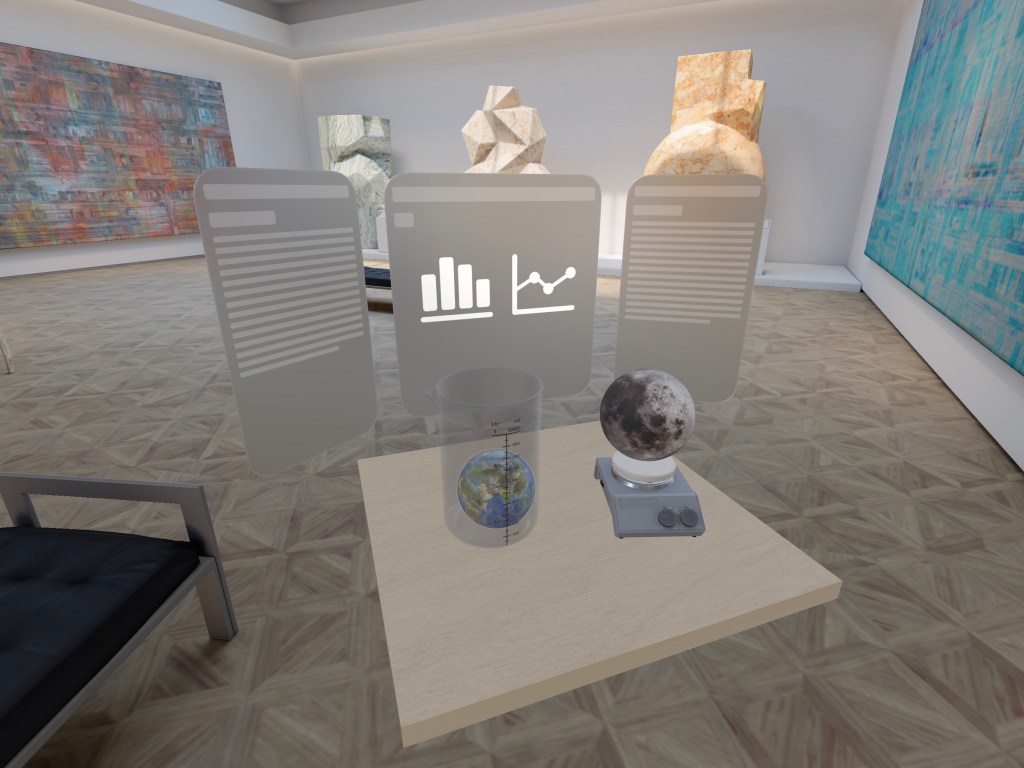
We can use the back anchors for ornaments to to display user interfaces and data related to our content.
Populating the back anchors with SwiftUI views is one of my favorite ways to expand on the content of a volume. This example uses three back anchored ornaments, as well as rotation and offset.
Full Example Code
struct Example052: View {

    let exampleTitle = "A title string goes here"
    let exampleDescription = "Lorem ipsum dolor sit amet, consectetur adipiscing elit. Gerendus est mos, modo recte sentiat. A mene tu? Scisse enim te quis coarguere possit? Utilitatis causa amicitia est quaesita. Nunc agendum est subtilius. Duo Reges: constructio interrete. Nam Pyrrho, Aristo, Erillus iam diu abiecti. Cave putes quicquam esse verius. Nos commodius agimus. At eum nihili facit; Aliter homines, aliter philosophos loqui putas oportere? Quantum Aristoxeni ingenium consumptum videmus in musicis? Quid enim de amicitia statueris utilitatis causa expetenda vides. Quod iam a me expectare noli."

    var body: some View {
        RealityView { content in

            if let scene = try? await Entity(named: "SwiftUIScienceLab", in: realityKitContentBundle) {
                content.add(scene)
                scene.position.y = -0.4

            }

        }
        .ornament(attachmentAnchor: .scene(.back), ornament: {
            VStack() {
                Text(exampleTitle)
                    .font(.extraLargeTitle2)
                    .redacted(reason: .placeholder)
                HStack {
                    Image(systemName: "chart.bar.xaxis")
                    Image(systemName: "chart.xyaxis.line")
                }
                .padding()
                .font(.system(size: 144))
                .foregroundStyle(.secondary)
                Spacer()
            }
            .padding()

            .frame(width: 460, height: 500)
            .glassBackgroundEffect()
        })

        .ornament(attachmentAnchor: .scene(.leadingBack), ornament: {
            VStack() {
                Text(exampleTitle)
                    .font(.largeTitle)
                Text(exampleDescription)
                    .font(.caption)
                Spacer()
            }
            .padding()
            .redacted(reason: .placeholder)
            .frame(width: 280, height: 500)
            .glassBackgroundEffect()
            .offset(x: -60)
            .offset(z: 80)
            .rotation3DEffect(
                Angle(degrees: 35),
                axis: (x: 0, y: 1, z: 0)
            )
        })

        .ornament(attachmentAnchor: .scene(.trailingBack), ornament: {
            VStack() {
                Text(exampleTitle)
                    .font(.largeTitle)
                Text(exampleDescription)
                    .font(.caption)
                Spacer()
            }
            .padding()
            .redacted(reason: .placeholder)
            .frame(width: 280, height: 500)
            .glassBackgroundEffect()
            .offset(x: 60)
            .offset(z: 80)
            .rotation3DEffect(
                Angle(degrees: -35),
                axis: (x: 0, y: 1, z: 0)
            )
        })

    }
}
Support our work so we can continue to bring you new examples and articles.
Follow Step Into Vision